
A long time ago, I posted an article about how to add JYJ’s official line. However, the program has changed a lot since 2013, and I have now (2016) updated this article here. 🙂
Line is a kind of messenger system, like Skype only it’s based out of South Korea. It’s like Twitter or FB for the US or like Weixin/QQ for China. You’ll find pictures, chat message, phone services, and you can join in on live chats as well.
GO HERE FOR DIRECTIONS ON DOWNLOADING LINE INITIALLY (WITH PICTURES ) Or if you want, just visit their website (https://line.me/en/download)

HOW TO FIND JYJ’s OFFICIAL LINE

On Your Computer:
- On the Computer, sign in to the Line app.

2. On the Blue/Grey Tool bar, Pick the Person with a “+” symbol for “Adding Friends”
3. Where it says “Official Accounts” click “See All”

4. Each country has different Official Accounts. For example, China will have JYJ(CN) and Japan has JYJ(JP). It might be in your country automatically or it might not. For example, I live in China so it gave me a list of China Official Accounts, but I don’t speak Chinese 😛 To change the country, go to the bottom of the screen shown above and click “Select Another Country.” For JYJ(EN) – JYJ English- go to “Philippines.” It won’t be on the US page, I don’t know why. 😦 For Chinese, go to China. For Japanese, go to Japan. For Korea, go to Korea. For English, go to Philippines. This is true for most apps. 🙂

4. Official Accounts are divided into clusters like “Entertainment,” “Shopping” – – – Go down to “Artists” and search through the names until you find JYJ(EN) (or whatever account you want). Click their name. You can see here that I was adding the Chinese version, but the English version will look the same on your screen just with English words.

5. Now Click the person with a + symbol to add their account!

6. If you Click the Voice Bubble with three dots (. . .) it’ll take you to their page! Now they have been added and you can start fan-girling or fan-guying out over JYJ 🙂 From now on, you can open Line, click the two people symbol on the grey toolbar for your list of friends and check out JYJ.
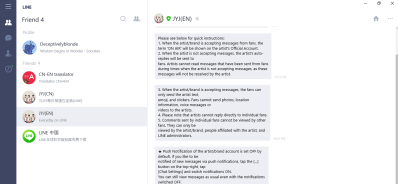 7. It takes about a day for anything to upload past their welcome message. They’ll show up as your friends on the mobile version as well once it is installed, and the same process applies: go to friends, click their name, and click chat.
For Your Phone
To be honest, the phone system sucks right now for me. I cannot for the life of me figure out how to change countries on this thing. But I think that might just be for me using it in China on a Chinese phone. If you figure it out, let me know.
Otherwise the process is pretty much the same.
- Sign into Line.
- On the toolbar at the top, click the three dots “. . . “
- Click “Official Accounts”
- If it’s there for you, go to the bottom to “Select Another Country”.
- Pick your country – Philippines
- Go through the list until you find JYJ(EN) or at the top just search for JYJ.
- Click their Name.
- Click the person with a “+” symbol.
- Click Chat and go rock out with JYJ!
Hope this helps answer some questions!
Tags: finding jyj line, Finding JYJ oFficial Line, How to Find, How to Find Line Accounts, jyj, jyj official line, Korean Line Accounts, Korean POp, Kpop, KPOP LIne Accounts, line, Line Accounts, Official Account

















 Deceptively Blonde