

Archive | Life RSS feed for this section

Important PC Keyboard Shortcuts

17 Mar

Cartoon Computer and Desktop by DTRave

I am always surprised at how many people are not aware of the keyboard shortcuts available on the Computer. A fairly quick typer, I would be lost without my quick fixes and shortcut options when working on Lawrence the Laptop!  But I teach a lot of college students and adults who aren’t really familiar with even some of the more basic options available. So here is a quick list! 🙂  *Sorry, I don’t do Mac, so I can’t help there 😦

The ones in Red are shortcuts I use really, really often and find most helpful. They make typing or online work much faster.

Ctrl +

  1. Ctrl + A = Highlight Everything
  2. Ctrl + B = Bold.
  3. Ctrl + C = Copy
  4. Ctrl + D = Favorite / Bookmark 
    1. Ctrl + Shift + D = Bookmark All Tabs
  5. Ctrl + F = Find (on the page or in the folder
  6. Ctrl + H = Open History Page
  7. Ctrl + I = Italics
  8. Ctrl + J = 
    1. In Word = Justify Left, Right, or Center
    2. In Browser = Open Downloads Page
  9. Ctrl + L = Start typing in the address bar
  10. Ctrl + N = Open New Page (or Slide or Document depending on the program you’re using)
  11. Ctrl + P = Print
  12. Ctrl + R = Refresh
  13. Ctrl + S = Save
  14. Ctrl + T = Open New Tab
    1. Ctrl + Shift + T = Open Previous Tab
  15. Ctrl + U = Underline 
  16. Ctrl + V = Paste
  17. Ctrl + W = Close
  18. Ctrl + X = Cut
  19. Ctrl + Y = Redo
  20. Ctrl + Z = Undo
  21. Ctrl + Enter = Adds “http://www.” and “.com” to anything you put in the address bar
  22. Ctrl and + = Zoom in
  23. Ctrl and – = Zoom out
  24. Ctrl + Left Arrow = Start typing at the beginning of the previous word.
  25. Ctrl + Right Arrow = Start typing at the beginning of the next word.
  26. Ctrl + Down Arrow = Start typing at the beginning of the next paragraph.
  27. Ctrl + Up Arrow = Start typing at the beginning of the previous paragraph.
  28. Ctrl + F4 = Close the window of all tabs but the one currently open.
  29. Ctrl + Alt + Delete = Open Task Manager (how to close pages that aren’t responding)

Alt + Buttons

  1. Alt + Tab = Move Between Open Pages
  2. Alt + Enter = View “Properties”
  3. Alt + Esc = Move between Pages in the order that they were opened.
  4. Alt + F4 = Close Page

F Buttons

  1. F1 = Help Page (for whatever program  you have open–i.e. using Google Chrome it opens Chrome’s help page. Word, it opens Word’s help page)
  2. F2 = Rename (if you highlight a file/folder)
  3. F5 = Refresh
  4. F6 = Instantly Start Typing in the Address Bar 
  5. F7 = Spell Check 
  6. F11 = Go to Full Screen (Open or Close)–Shortcut for making videos big 🙂
  7. F12 = “Save As” window in Office

Shift + Buttons

  1. Shift + D = Delete permanently without sending to “Recycle Bin”
  2. Shift + F3 =
    1. When using Microsoft Office = Click to easily go back and forth between 1. all small letters 2. Every Word Is Capitalized and 3. ALL CAPITAL LETTERS.
    2. When using a Browser = Find
  3. Shift + F7 = Highlight a word and use Shift + F7 to look it up in the Thesaurus

Windows + Buttons

  1. Windows + D = Show Desktop
  2. Windows + E = Open “My Computer”
  3. Windows + F = “Search All Files” option will open so you can search your entire computer
  4. Windows + M = Minimize all Windows.
  5. Windows + Shift + M = Restore (Maximize) Windows

Other Buttons

  1. PrintScreen (PrntScr) to take a Screenshot. Then Paste it into OneNote or a Word Document and save as a picture.
  2. Hold down Shift while Highlighting to Highlight things in a row.
  3. Hold down Ctrl while Highlighting to Highlight unconnected words. 
  4. To pull a group of tabs off into a new page–> Click the first tab + Hold down Shift + Click the last tab . Now Click and drag off the toolbar and they’ll come off and open up in a new page together. Only works in some browsers!

Happy St. Patrick’s Day (From China)

17 Mar

I was the only foreign teacher initially dressed up for St. Patrick’s Day today! Such a tragedy! I, looking so awesome, of course promptly shamed a couple people into going back and adding some green to their wardrobe.  (ehm, Andre –better a late green than never). . .

Having class today, I asked my students if they knew what holiday it was. They didn’t (another great sorrow of my life), so I brought up pictures of the Parades for them to see and told them about the leprechauns and the green Chicago river.  🙂 

I finished by letting them know that if they didn’t hurry home and add some green themselves, it was perfectly likely they might get some pinching. Their eyes went so wide. 0_0 It was hilarious. Made my day!

So happy St. Patrick’s Day!!


Blue of the Sea

17 Mar

DSC_0877

Spring is here! 

The cherry trees are blooming, the dogwoods flowering, and the sun is sharing its warmth. 

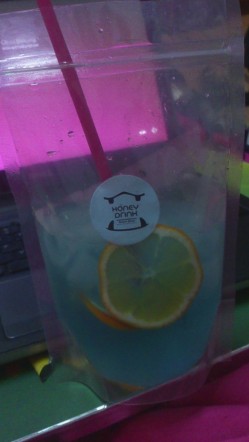
Today it was so nice, I stopped at the “Honey Drink” shop and picked up a “blue drink.” They called it a “lan seng” or that’s what it sounded like. 🙂

It’s a mixture of syrup/flavoring, oranges, lemon / lime, and ice. Taste’s like a blue Popsicle! 

The shop is one of many “student-owned” businesses here on campus. They have an Incubation Center and a focus on Entrepreneurship, so the school encourages students to start up their own businesses. If you get a chance to visit Xinzheng, let me know and I’ll treat you!

Happy Spring!

Image

Is It Bigger on the Inside?

16 Mar

A.B.A. to Enforce Stricter Timeline for Law Graduates to Pass the Bar Exam

16 Mar

**Law Students – Input? DB

“A.B.A. to Enforce Stricter Timeline for Law Graduates to Pass the Bar Exam”

by Elizabeth Olson via “NY Times

American Bar Association’s accrediting body put law schools on notice Monday that it intended to tighten a rule that sets a deadline for graduates to pass state bar exams — a near-universal requirement for becoming a practicing lawyer.

The new measure would clarify the existing deadline that 75 percent of students pass within two years. Bar passage rates have been falling noticeably across the country.

At issue for the schools is their accreditation by the association. The theory behind the rule, which is one factor in accreditation, is that schools should be accepting students who are likely to have the qualifications to become practicing lawyers. Proponents of the change say that schools exploit students when they accept those who — based on admissions tests and other measurements — have a small chance of succeeding. . . .

READ MORE

Feel Like Dying My Hair Blue and Telling World to Take a Hike

16 Mar

Feeling rebellious. I need a day for me–wander through a museum or art gallery or temple or palace or park or something. Put my earbuds in, get lost in some music, and just walk. With a heart-thumping beat that makes you forget the world and other people exist until all that is real is you and the music and inspiration for a life that is wonderful

Image

Yes, that is me

15 Mar

Jobs Should be Interesting, Not Death-Inspiring

14 Mar

One thing that always bothers me, is that people read this quote to say that you should go have an “exotic” or “expensive” job. I often have people say that sometimes you just have to do the boring or depressing job because you need money. My answer is this–if the job isn’t something cool, then make it more fun. Be a happy person, play jokes, ask interesting questions, change the environment to be more fun. Just because the work itself is dull, doesn’t mean the job has to be. **DB

“People rarely succeed unless they have fun in what they are doing.”

– Dale Carnegie

Photographer Travels Around The World To Capture The Beauty Of Doors And Windows

14 Mar

“Photographer Travels Around The World To Capture The Beauty Of Doors And Windows”

by Agata Gri via “Bored Panda”

You may remember a post last year by Andre Vicente Goncalves, a Portuguese computer-scientist-turned-photographer who traveled the world taking pictures of windows that he then compiled into beautiful collages.

Not content to stop at windows, the globe-trotting photographer now brings us a whole new project that focuses on a different subject: doors.

Much like his previous project, his latest project, titled Doors of the World, follows a similar theme by making use of collages to present his beautifully colorful findings.

We often think of doors as something practical, an item necessary to our lives only because of what it does for us. But this project reminds us that doors aren’t just there to be opened and closed – they’re also there to be admired.

If you like these pictures then click here to see some captivating photographs of floors in Barcelona.

More info: andrevicentegoncalves.comFacebook

Spain

Portugal

Romania

England

Windows of the World: Venice

READ MORE

Life in China ~ Alternative Babydoll Lifestyles

14 Mar

DSC_0088

DIAPERS v. THE SQUAT & GO

Was sitting at the window in KFC (yes, thank God we have KFC here–our only Western restaurant in the area!) when I saw the funniest “cultural difference” on display.

Growing up, I frequently worked as a babysitter for children in the States. The little girls loved their dolls and treated them like real children.  They dressed them, fed them bottles, rocked them, and–always funny–changed their diapers.

Well little girls in China are the same–sort of.  This local girl was waiting with her mom at the bus stop and playing with her doll.  She rocked the dolly, patted the dolly, played with its dress.  But then, she proceeded sit the dolly in a crouch and teach it how to do its bathroom business out on the sidewalk.

That’s how children go to the bathroom here. The parents take them outside on the sidewalk, they drop trou, crouch, and do their stuff. The babies all have split pants (pants with large holes around the bottom-area), and they don’t even have to pull their pants down.  

Once I though about it, of course that’s their version of changing diapers–it makes total sense! But it was still hilarious to watch. Seriously, she patted it, talked to it, helped straighten its dress when it was finished.  Such a good mommy-to-be!  But talk about cultural differences! 😛