Archive | Computer Issues RSS feed for this section

Life abroad: Vypr VPN

21 May

**I fixed the prices – I was doing it monthly, but I went back and re-calculated the price based on an annual purchase 🙂 Much cheaper that way!

Vypr VPN

A while back, I did a review of Astrill’s VPN service and quite a few of you were interested in learning more about other VPN services!  

The internet is a wonderful, beautiful place full of friends, libraries, travelers, and fellow photographers. It is also a dark and scary place full of perverts, hackers, and identity thieves. Personally, I want to be able to access the first group while putting myself at less of a risk of the second group! Wouldn’t you agree? 🙂


I’ve now tried a few VPN programs here and there, and I wanted to keep you updated on my findings.  

VYPR

I had heard about VyprVPN before, since quite a few people at my institution like to use the program instead of Astrill.  If any of you have been following my updates and the news, you would know that Astrill has been off and on recently.  I’ve had a lot of problems where it doesn’t work on my IPad, and it is frequently stopped working on my computer as well. I have days where it is not operating and right now, about once a day I have to turn it off and re-boot the program. Plus, they recently had to put out a warning that a government in Asia had seized their servers in an investigation. While that doesn’t affect me, a lot of users weren’t happy that they were that vulnerable.

So when I recently was given the opportunity to test out VyprVPN, I thought I’d give it a try.  The people I know who use it gave it pretty good references through last year, and now here I’ll give you info on my experiences with it. 🙂

In interest of comparing this with Astrill, I’ve used the same 2+ people on several devices as my basis for both.

Price: $100/year (billed annually).

Review:  There is a basic plan ($80/yr)  that has almost all the features (minus: the Firewall, some cloud storage, other protocols), but it only allows for 1 simultaneous connection. Given that my family has two people online most of the time, 1 connection wouldn’t be enough.  So I need to get the VyprVpnPro system at $100/yr.  It comes with everything I need, and includes 2 simultaneous connections.  You would definitely want to buy it annually, the price almost doubles if you do it monthly.

You can start with a 3-day free trial, and cancel it if you don’t like it. I like this process, because it lets me see if it will really work before I hand over that much money.

If you do decide Vypr is for you, go through this link for an extra 50% off your first month 🙂

Installation: Easy (very)

Review: There were no problems with Installation, it downloaded smoothly and started right up. One small confusing thing is that the website for Vypr is called GoldenFrog, so go to http://www.goldenfrog.com to set up an account.  You’ll start by setting up the account and getting your username and password.  Then you need to download the program.

Download process is easy, just double click to open the installation program and walk through the steps. Unlike with Astrill, there were no problems with the Proxy Settings on my computer, the instant I downloaded it, it went to work!

Use: Easy (pretty much)

Thankfully, the interface of the program is pretty easy to use. If you have a techno-dummy on your hands, they can use this without too much trouble.  

When I turn on my computer, I open the program from my desktop.  You can set it up to start automatically if you want.  The box will look like this:

Untitled picture

If you want to just connect right away, just click the blue connect button. If you want to change locations, click the exclamation mark looking blue button.  

The little gear in the top right corner is where you can change the protocols.

That’s all there is to it! Just click connect and then close the program when you’re done.

Access: Scattered 

First, let me say that this part may be unfair to Vypr.  Many people in my school swear by Vypr; they claim that it is tons better than Astrill and works great for them.  At least 2 other people though have had the same problem I have – none of the servers connect on our computers.

The technology is easy to use but works sporadically and is highly unreliable for me – remember others say it works fine in the same building.  Their website says that if Vypr is not working with a US connection, try hooking in to Netherlands or Hong Kong.  I’ve had a lot of problems with Vypr’s connections in the US, so I tend to rely on the Netherlands or Hong Kong system.  However, that is still very sketchy in regards to successful connections. Plus, there are several websites that require that you be connected to the US for them to work, such as Hulu.  

So far, on my Apple Products, Vypr is more reliable than Astrill.  However, Astrill is more reliable on my Windows Laptop.  It’s kind of a toss-up there. I have not attempted either on a Mac, but I would presume that Astrill is less reliable on a Mac as well. 

Customer Service: Good

Actually, I haven’t really had a reason to talk to their technical support. I have asked questions of my account manager though, and he was incredibly personable and friendly.  Vypr has been very gracious when I speak with them, and I haven’t had any problems on that front!

Conclusion: This service isn’t great on my Windows laptop, I have a hard time getting a connection, even through Hong Kong or Netherlands.  On the other hand, it’s been pretty stable on my Ipad, so there’s that.  Other users have conflicting experiences. Some swear by it and others say it’s not working much.

The program is expensive, more than some competitors, but if it works on your Mac when other programs don’t that might be worth the cost.  I don’t have any problems with turning it on and off, it’s incredibly easy to use. I like that I can change servers as often as I want!  I also like that there is a program no matter what device I use.  There aren’t any add-ons you have to pay for or consider which is pretty sweet; they just come with the program.

All in all, if I could figure out how to make the connection work more often, I would really like this system.  Maybe y’all have some tips?

This is my experience with Vyprvpn, anyone want to throw in their opinion of ExpressVPN to give a comparison?  How have you done with Apple Products here? Windows? Android?

Email in China

1 Apr

Over time, it gets harder and harder to use Google and Outlook products here in China. This is a particularly large issue for the wonderful world of email.  Gmail and Outlook mail are no longer working properly even with a VPN.  

The largest problem I’m confronting right now is that Chinese services are blocking “Received” messages from Gmail or Outlook accounts.  For example, QQ (which my students all use), is completely rejecting anything from GMail or Outlook.  

So what can you use?

Well, here are a couple alternatives:

  • QQ – This is what most of the students are using. Basically, you register and download QQ International, and one of the options available to you with an account is QQMail.They have unlimited space and you can add large attachments. The downside is remembering your totally random QQ# email address (e.g. 123456789@qq.com).
  • Foxmail – Doesn’t work with a VPN on.  Offers you an email system that’s pretty good
  • 163.com – Download with Google Chrome browser so you can translate the system into English while you set up your account. Pretty good, a lot of students use it.  

I’ll try to do a comparison on them later. Right now, I use QQ, and I like it a lot. I do get tired of not being able to send an email to very many people and you keep having to enter confirmation codes. But it works!

Things I Hate about the new “New Post” and “New Stats” Pages on WordPress

16 Mar

I’m usually pretty excited about new updates to technology.  New website versions up and running? I’m willing to give them a chance.  Of course, Facebook is driving me nuts (especially with the Messenger updates), but I’m typically happy with the new options most programs offer when advancing further into new designs and offerings.

WordPress has been one of those websites I really, really love.  I love the simplicity, I love how I almost instantly figure out what I need to do to accomplish my websites’ goals.  I love that it looks nice, and that my websites reflect that.  I love that it stays up-to-date.

But I’m really, REALLY not enjoying the new “New Post” and “New States” pages they are unveiling.  It’s much worse than the old pages for a variety of reasons.  Most of these issues are things I’ve lost with the new layout – maybe I’m missing something, but if so then so are a lot of other people. I always liked how easy it was to find things, and now I feel like a lot of stuff is just gone.  For example: Continue reading

China Tools: Kingsoft v. Microsoft Word

12 Mar

The first time you get a WPS document, it throws you off a bit. For three weeks, the other professor kept telling me the students were sending in their homework on bad files and the students insisted otherwise. It took us that long to figure out it was a problem of software.

In America, we pretty consistently use Microsoft Office for our office needs. Maybe Apple users pick up a few other programs, but Microsoft Powerpoint, Word, and Excel have been staples in our systems for decades. But a new program is catching up, and it has Microsoft at a disadvantage.

The new system is called “Kingsoft” and it offers alternatives to Word (Writer), Powerpoint (Presentation), and Excel (Spreadsheet).  And the programs are highly competitive!

Right now, you can get the Office 2014 version for FREE! Yes, that’s right, FREE! Compare that to the current going rate for Microsoft Office, and clearly the price is totally right.

Then there’s the fact that it actually works faster than Microsoft. I was recently running Excel and Spreadsheet at the same time with the same program. Excel kept glitching and trying to “process” that much data. It moved slowly and clunkily.  Spreadsheet has a smooth feel, never stumbled no matter how many rows or columns I added, and just processed everything faster. The difference in the save time is mind-blowing.

I also like that the Kingsoft programs open files in Tabs, like browsers now do. So I don’t have 18 different boxes open on the taskbar, instead I just move easily back and forth between tabs to compare notes.  

Kingsoft has a boatload of templates, many of which has really sleek designs and feel. It offers everything I ever used on Microsoft, and has extra perks that I really appreciate. So I haven’t exactly done a complete comparison, and I can’t say that they are basically identical. But I’ve used this system for about 7 months now and I’ve never been missing a function or tool that I needed.  

So I’m definitely making the switch to Kingsoft from Microsoft. I just like it better. But sadly, a lot of Americans still don’t know about this option. Come on guys, it’s free!


**PS, I get no $$$ or support or anything from Kingsoft for this; they’ve never heard of me and never will. It’s an honest-to-heaven review of a program I love. I’m tired of paying big bucks for Microsoft only to loose the download cd or the “product code” or to have it crash. Kingsoft is a free download. I love it!

Registering for a Sina Blog

3 Mar

1

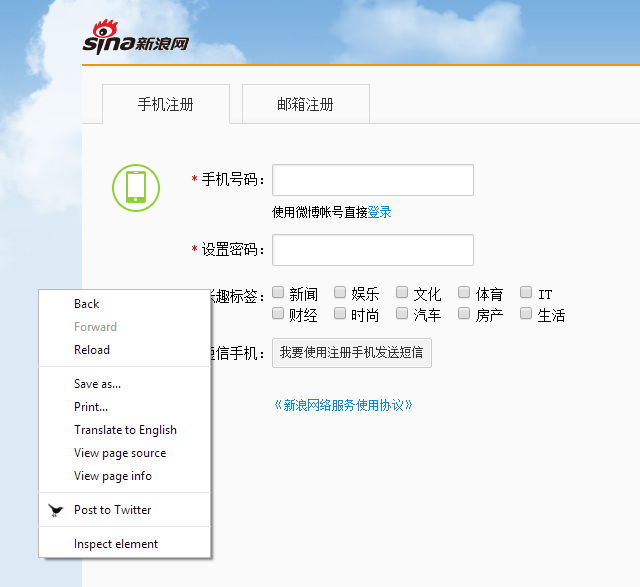
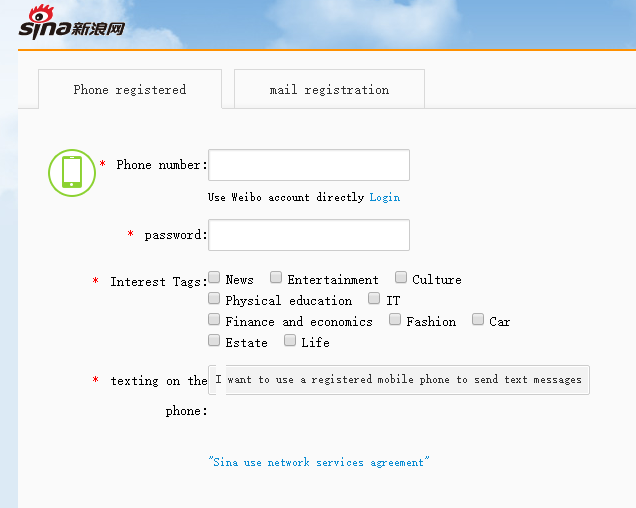
  • I recommend using the Google Chrome Browser. Then right click on the page and click “Translate to English.” The translation is pretty good! Otherwise, You’ll have to work with the page in Chinese.

2

  • There are two options: Phone Registration or eMail. They are both pretty straightforward. The second tab is Email Registration and is fairly straightforward.  The boxes in order are Email Address, Password (6-16 characters), Interests (New, Entertainment, Culture, Sports, Technology, Finance, Fashion, Auto, Real Estate, Life), and Security Code.  That should register you, although you may have an activation email sent to your email.  The first tab (Phone Registration) is only slightly more involved.  The boxes in order are Phone Number, Password (6-16 characters), Interests (New, Entertainment, Culture, Sports, Technology, Finance, Fashion, Auto, Real Estate, Life). After entering that information, click the box that says “I want to use a registered mobile phone to send text messages” (我要使用注册手机发送短信).  Then text the phrase “yz” to the phone number 1069009010021.  Wait about 3 minutes and then click the green button.

3

  • Yay! You’ve Registered!
  • If you want to sign in again later, just go to http://blog.sina.com.cn/.  Use your username and password.

Astrill Update

5 Feb

Yay! Astrill is semi-working on Apple again! And it actually seems a little better than before.  🙂  It started about 2-3 days ago and has been going on so far.  It drops every so often, but then it picks up again.  I haven’t tried visiting any blocked sites (I know some people who said those still threw them off), but it is helping keep my computer safe while I visit the allowed ones like my Outlook email again.  I’m happy!

VPN Update in Asia

26 Jan

Picture

So, reports have been out recently that the VPNs in Asia aren’t working as well as normal.  The reports are definitely true.  Actually the internet in general isn’t working that strongly right now, but that could just be my specific place.  O_o

But in general, Astrill has been causing a lot of problems recently, as have ExpressVPN and VyprVPN.  Astrill is completely uncommunicative on Apple products, which is a bite to a lot of people here at my institution.  I’m not so sure about the others working on Apple, but I know that a lot of PCs and Androids are also having problems.  So far, Astrill is working just fine on my PC, but not all the time on my Samsung DuoS phone and not at all on my IPad.

Astrill says it is attempting to update an app for use in Asia, but we’ll see how it goes. To be honest, I don’t know a lot of VPNS that work well on IOS systems at any time.

Life in China: WeChat

12 Jan

As I’ve mentioned before, China = no Facebook, Twitter, or Instagram.  However, the Chinese are nothing if not inventive, and they have their own wonderful systems for instant messaging, status posting, and picture sharing.  

The first is called QQ, and I’m still getting used to that system because it is almost entirely in Chinese. They have an English version, but the English doesn’t cover many of its tools. It is a little more widely used only in that students use it more often in a day (think Facebook). Every student I’ve met also has a program called WeChat (said Weesheen), and it is how students and foreigners contact one another. It is also the replacement for Twitter for many students, so it is important to be familiar with the program.   Continue reading

Life In #China: Astrill VPN

5 Jan

Astrill VPN

Life abroad has many, many benefits for foreigners to reap – great food, cheaper cost of living, easy travel.  It also comes with slow internet speed in many places (just too many people online at once), and lots of online threats (the sheer technological ability of the people even in my student body is mind-boggling.) This is why I always work with a VPN (virtual private network), in fact I use one in the US too.

I like the security a VPN offers from those with bad intentions towards my laptop.

A VPN can satisfy the need for speed and security for me- the internet system here at my university is A. slow as heck (yes my VPN makes my laptop faster here for some reason) and B. filled with hackers and viruses waiting for me to seek them out.  A VPN can help keep you fast and safe. Sometimes. Depending on which VPN you choose.

I just hate the feeling that I’m that at risk to viruses, and I’d been using a VPN in the States to help combat malware and data theft.  I didn’t want to travel abroad and leave myself at risk to scams or bad people sneaking into my computer.   I’ve heard good things about VyperVPN which runs at about $80/year for 1 device or $100/year for 2 device. Another one recommended to be was ExpressVPN which runs at about $100/year for 1 device and 1 phone/ipad.  However, after some consideration, I decided to run with Astrill, recommended to me for its price and easy usability.

After more than 5 months as an Astrill user, I thought I would offer you a report on how it’s going.

Price: $70/year + $60/year for use on 5 devices (covers my whole family, phones, laptops, iPad, and more).

Review: The price was one of the lower ends of the group, especially if you want a family plan.  Honestly, I’m still paying a surprising amount, but it isn’t too terrible.  I get StealthVPN (a safer option) free if I tweet an ad for Astrill every month, which is nice.  One problem I ran into is that I attempted to pay Astrill in August, only to find out in October that despite having a confirmation number, the bill was unpaid.  I tried a second time only to find out the same again.  Their payment system kid of sucks. Conversely, they didn’t shut off my program for any of the mess though, so that was a plus.

Installation: Easy (sort of)

Review: Installation is pretty easy. You set up an account with username and password and then download the program.  It’s all fairly straightforward. There was a problem with my first installation because it screwed up the Proxy Settings on my computer so that NOTHING worked. I took it to the resident tech expert and he fixed it in about a second.  Something about DNS servers not responding. Not ashamed to admit I don’t know what went wrong, just that it was easily fixed.  

Use: Easy

The program is extremely easy to use as long as it is working. It automatically signs you in, you pick your server from a drop down list, and it connects you right up.  If you want to see what server is the fastest, go to Help-> Test Speed and just test all the servers.  I recommend using a server from the USA if you want to access all US websites. Remember that if you want to use websites not available in the US like Youku or Tudou you need to use a Chinese server.

Access: Scattered and Bumpy

The technology is easy to use but works sporadically and is highly unreliable.  Unfortunately, they failed to tell me until after I paid that Astrill rarely works on Apple Products right now. Something about IOS 7 and IOS 8 not being compatible. Astrill keeps dropping off on my iPad and often fails to work at all.  On my laptop, it is often extremely slow, even if I use multiple different servers or if the speed test says it is fast. I have had repeated days when it simply didn’t work at all.  I also got a pretty snotty email about a week ago on CHRISTMAS EVE!?! telling me that they “detected suspicious movement” and were freezing my account. Given that this was my only way to contact my family in America (one of the reasons I had Astrill), I was not impressed.  Upon responding to them, I was told that I was changing servers too many times. 0_0 well duh! I purchased a product that now rarely works and only then if I test out several different servers.  I wasn’t amused. That said, when it works it does pretty good. I don’t really have any trouble accessing Facebook or Youtube videos when it is working. It helps if you have a fast internet connection cause Astrill can slow you down. My mom’s internet connection is pretty week and Astrill OFTEN stops working at all for her regardless of the server chosen. Continue reading

Apple I-PAD Stuck on Apple Logo

19 Nov

Lawrence the Laptop crashed and burned once again not too long ago.  I probably wrote about it, but I’m too lazy to go back and look.  In turn, I ended up buying an Apple Ipad during 11/11 (China’s version of Black Friday).  

Annoyingly, I no sooner got it than the I-Pad froze on the Apple Logo.  Luckily, it appears that this is a somewhat common problem.  It won’t go past the opening screen and won’t connect to your laptop for Restore.  

Finally, I figured it out!

  1.  Turn your Ipad off by holding down the Power and Home buttons at the same time until the screen turns black. 
  2. Turn on I-Tunes
  3. Attach the I-Pad plug to your computer ONLY.
  4. Important part: Press the Home Button down, and hold it while connecting the plug to your Ipad.  
  5. Your Ipad will show a “connecting to Itunes” screen (looks like the plug reaching up to the itunes logo).
  6. Release the home button.  
  7. Follow the instructions on your screen to restore your Ipad!